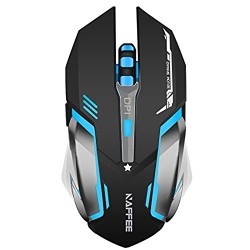
TENMOS X96 Rechargeable Wireless Gaming Mouse USB Optical LED Silent Computer Mouse for MAC/PC/Notebook, 4 Adjustable DPI, 6 buttons (black)
Key points 1. Bult-in rechargeable li-battery, no need to change batteries. Charges while playing games over a single standard micro USB cable. 2. Ultra long-distance(up to 10 meters) wireless transmission. 3. Special soundless design for the left and right buttons, you can use it in your office to build a quiet office atmosphere. 4. This
Key points
1. Bult-in rechargeable li-battery, no need to change batteries. Charges while playing games over a single standard micro USB cable.
2. Ultra long-distance(up to 10 meters) wireless transmission.
3. Special soundless design for the left and right buttons, you can use it in your office to build a quiet office atmosphere.
4. This mouse fits naturally in your hand with no cramping after extended gaming or work sessions.Comfortable grips make it suitable for each kind of crowd.
5. DPI design professional gamer, 1000-1200-2000-2400 DPI free switch.
6. 6 buttons. Quick thumb-side buttons, fast forward and back and up and down to achieve the function.
7. 7 different colors change alternately. It can not be set to one specific color. There is an on/off switch underneath the mouse.
8. Easy to setup. No additional software required. Simply plug and play.
How to use
1. Take the dongle out, which is underneath the mouse.
2. Insert the dongle into the USB port of your PC.
3. Turn on the mouse, the switch is at the bottom of the mouse.
4. Allow a few seconds for installing, no action needed, just wait. Then you can use the mouse.
Note
1. It’s out of power if the mouse pointer moves slowly or stop moving.The blue light beside the scroll wheel will be on while charging, and then goes off when the mouse is fully charged.
2. The switch has three terminals, mouse off/mouse on/light on. If you do not use the mouse, switch it to the top terminal. Switch it to the bottom terminal if you need the LED lights up. Switch it to middle if you do not need the light.
3. The charge port is at the bottom of the left button.



', 'https%3A%2F%2Fpcgamerstores.com%2F%3Fp%3D2973'))
Comments