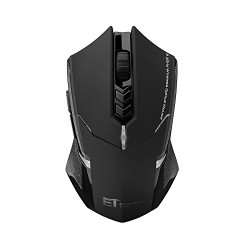
Habor Gaming Mouse Wireless Optical Mice 2400 DPI 7 Buttons Computer Mouse for PC Laptop Notebook
Power Saving Mode and Power Switch off If the gaming mouse stays out of work for 8 minutes, it will turn to power saving mode, press any button to restart the mouse for gaming. If you turn off PC or take out Nano receiver from USB port, press any button or move the gaming mouse
Power Saving Mode and Power Switch off
If the gaming mouse stays out of work for 8 minutes, it will turn to power saving mode, press any button to restart the mouse for gaming.
If you turn off PC or take out Nano receiver from USB port, press any button or move the gaming mouse to enter the power saving mode.
Ergonomic Design
Ergonomic Design, comfortable and great hand-feeling, can be used for a long time without fatigue.
Compact Receiver
The wireless tiny receiver of the wireless gaming mouse can be inserted into the slot next to the battery slot, allowing ease of storage when not used.
Solid Storage Case
The plastic storage case is robust and solid enough to protect your gaming mouse when you do not use it.
How to set DPI:
Press DPI button, if the red indicator light of the gaming mouse flashes once, its DPI is 800.
Press DPI button, if the red indicator light of the gaming mouse flashes twice, its DPI is 1200.
Press DPI button, if the red indicator light of the gaming mouse flashes three times, its DPI is 1600.
Press DPI button, if the red indicator light of the gaming mouse flashes four times, its DPI is 2000.
Press DPI button, if the red indicator light of the gaming mouse flashes five times, its DPI is 2400.
(The default DPI is 1200)
Specification:
Color:black
Gaming Mouse dimension: 4.9*2.8*1.5in
Gaming Mouse weight: 2.9oz
Press-key Quantity: 7 Buttons(including scroll wheel)
DPI: 800-1200-1600-2000-2400
Power Source: 1*PCS AA Battery(Not included)
TIPS:
This wireless mouse for gaming, is perfect for entry level casual gamers, but not a substitute for high end gaming mice.
Package included:
1* Wireless Gaming Mouse
1*USB Receiver
1*User Manual

)
Comments