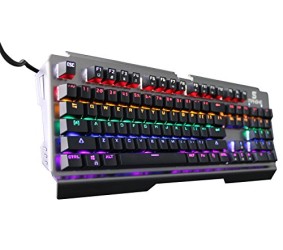
Merdumia Wired USB Mechanical Gaming Keyboard,RGB Backlit 104 Keys Blue Switches Gaming Keyboard for PC & Laptop Gamers
WHY CHOOSE THE Merdumia KEYBOARD AS YOUR FIRST MECHANICAL KEYBOARD? COMPATIBILITY&ANTI-INTERFERENCE CORD Merdumia gaming keyboard can suits many PC system,just like Win2000/XP/ME/Vista/7/8,Android/Linux and Ma-c system and there is no worry about the compatibility. USB wire supports antistatic interference function! ANTI-GHOSTING 104 Keys Anti-Ghosting!Each key is controlled independently and it gives an accurate response even when
WHY CHOOSE THE Merdumia KEYBOARD AS YOUR FIRST MECHANICAL KEYBOARD?
COMPATIBILITY&ANTI-INTERFERENCE CORD
Merdumia gaming keyboard can suits many PC system,just like Win2000/XP/ME/Vista/7/8,Android/Linux and Ma-c system and there is no worry about the compatibility.
USB wire supports antistatic interference function!
ANTI-GHOSTING
104 Keys Anti-Ghosting!Each key is controlled independently and it gives an accurate response even when hitting multiple keys at the same time.
SENSITIVE&RESPONSIVE
Blue Switch can provide nice satisfying click sound. While playing games, the switches provide the faster response than common keyboard.
REPLACEABLE SWITCHES
All keys support switch DIY replacement. Just use a puller tool(Include) then you can pull the switch from the axle on a socket then mount a new switch on the socket.
Which made the replacing switches more simple.
Specifications:
Color: Black
Cord:1.5m
Key Quantity: 104 Anti-Ghosting
The Keyboard Size: 460*168*35mm
Operating current:180mA
Interface: USB interface
Mechanical Switch Type: Blue Switch (with clicky sound)
Key Stroke Travel: 2.0±0.6mm
Key Lifespan: 50 million times strokes
Compatible system:Win2000/XP/ME/Vista/7/8,Android/Linux and Ma-c system
Note:
There are eight lighting modes, one of which you can customize the button LED light off, you can customize the six groups;
SL key (choose the right mode)→Fn+Del(the indicator light flashes)→Customize your stycle→Fn+Del(Save this operation)→Fn+Ins(Toggle the mode you defined).
Friendly Reminder:
If you have any questions during use the keyboard,please let us know first time and we will do our best to help you solve it!
Some of the shortcuts need you use “Fn” unlock the shortcuts first!



)
Comments