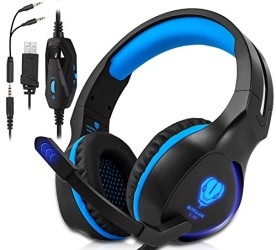
Xbox One, PS4 Gaming Headset , Headphones with Mic and LED Light for Laptop Computer,Stereo Gamer Headphones,3.5mm Wired Noise Isolation Gaming Headphones (Blue)
♥Product Introduction ◇LED dazzle light ◇Used for single hole interface ◇Used for one-to-two tieline ◇Volume control button ◇Microphone on-off button ◇USB interface for power supply for the LED lights ◇High sensitivity microphone delivers more accurate ,clear and dmooth voice ◇High-quality dound production unit offers high,medium and low audio experience ◇Light design,self-adjusting head beam design,the best
♥Product Introduction
◇LED dazzle light
◇Used for single hole interface
◇Used for one-to-two tieline
◇Volume control button
◇Microphone on-off button
◇USB interface for power supply for the LED lights
◇High sensitivity microphone delivers more accurate ,clear and dmooth voice
◇High-quality dound production unit offers high,medium and low audio experience
◇Light design,self-adjusting head beam design,the best game wearing experience
◇Skin type protein earmuff,environmental protection,wearproof and comfortable to
wear
◇3.5mm international standard(CTIA)device interface(right channel+/ground-/left
channel +/microphone+)
♥Range of Application and Operating Instructions
1.The headset applicable to 3.5mm quadrupole dingle plug audio device such as
laptop,tablet PC,mobile phone,etc.with the bisected adapter cable of 3.5mm
interface,the 3.5mm dual plug of the computer can be used
2.Generally,the cable end or microphone end is designed on the left-side,so wear the
cable end or microphone end on the left ear when wearing headset
3.When using the headset on conputer,please make sure the headset microphone
switch is turned on;then make sure the computer microphone switch is turned
on.please find the “speaker”icon in the computer taskbar,and double-click to enter the
volume control for settings.and enter into the “voice”for settings on the “control panel”
4.Please make sure the headset volume adjustment button is at the minimum
volume,and can be adjusted to the apporopriate volume
5.Please use the headset to enjoy the game
6.Supprot the 32-bit and 64-bit win7/win8/win8.1/win10/xp
★ ★ If your headset have any questions, please contact us. We will give you free replacement according to HAIOZHIXUAN’s policy


', 'https%3A%2F%2Fpcgamerstores.com%2F%3Fp%3D8042'))
Comments