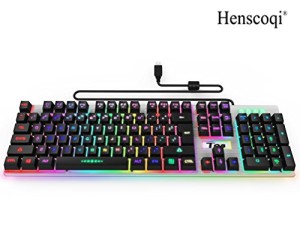
[Cyber Monday Deal]Gaming Keyboard,Henscoqi T98 LED Multicolor Backlit Computer Keyboard with Adjustable Backlight USB Wired Illuminated for PC Laptop (K2 Keyboard)
Rainbow backlight to increase keyboard visibility in dark environments, 19 keys no-conflict,mechanical feeling. Durable, comfortable for work,smooth for games. Keyboard feature • Professional gaming keyboard design, adjustable multicolor backlit • 2-level high-strength supporting foot • Non-slip design for the best gaming performances and comfort • 19 anti-ghosting keys, enable free control • The keyboard can
Rainbow backlight to increase keyboard visibility in dark environments, 19 keys no-conflict,mechanical feeling. Durable, comfortable for work,smooth for games.
Keyboard feature
• Professional gaming keyboard design, adjustable multicolor backlit
• 2-level high-strength supporting foot
• Non-slip design for the best gaming performances and comfort
• 19 anti-ghosting keys, enable free control
• The keyboard can auto sleep if it is not in use for 3-5 minutes. To reactive,just press any key
Technical specification
Connection: Wired
Backlighting: multicolor Rainbow backlight
Backlight Brightness: High/Mid/Low Levels adjustable
Key Number: 104 Keys
Interface: USB
Backlight color switch:Press FN + SCRLK
Backlit breathing lamp switch:Press FN + SCRLK
Backlit breathing speed control: FN + / FN + “+” “-” control breathing rate.FN + “-” breathing a little slower, FN + “+” to speed up breathing, built three levels, by default, the first leg of the first one in 1.5 seconds, a respiratory cycle is the second leg for 3 seconds, the third party is 6 seconds. Backlight lamp brightness control: FN + PGUP increase brightness, FN + PGDN brightness decreases, and the default backlight model default backlit highest brightness, high/medium/low/no lights, four lights brightness adjustment function.
FN shortcut FN + F1=Play music
FN + F2=Volume down
FN + F3=Volume up
FN + F4=Mute
FN + F5=Music stop
FN + F6= Previous song
FN + F7= Play/Pause
FN + F8= Next song
FN + F9= Mailbox
FN + F10= Home page
FN + F11= Lock/unlock Keyboard
FN + F12= Calculator


', 'https%3A%2F%2Fpcgamerstores.com%2F%3Fp%3D8122'))
Comments