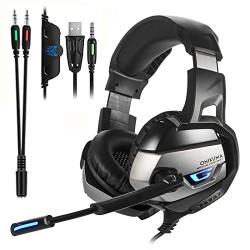
ONIKUMA Gaming Headset for PS4 ,PC,Xbox One Controller,Noise Cancelling Bass Over Ear Stereo Headphones with Mic,Bass Surround,LED Light, Soft Memory Earmuffs for Laptop Mac Nintendo Switch Games
▶Specifications: Model: ONIKUMA K5 Speaker diameter: 50mm Impedance: 16ohm±15% Sensitivity: 114dB±3dB Frequency: 20-20000Hz Mic dimension: 6.0 * 2.7mm Mic sensitivity: -36dB +/- 1dB Mic impedance: 2.2kohm Directivity: Omni-directional LED working voltage: DC5V +/- 5% Working current: Below 100mA Headset interface: USB (plug the USB connector, LED light is on, unplug for off) + 3.5mm ▶Stereo
▶Specifications:
Model: ONIKUMA K5
Speaker diameter: 50mm
Impedance: 16ohm±15%
Sensitivity: 114dB±3dB
Frequency: 20-20000Hz
Mic dimension: 6.0 * 2.7mm
Mic sensitivity: -36dB +/- 1dB
Mic impedance: 2.2kohm
Directivity: Omni-directional
LED working voltage: DC5V +/- 5%
Working current: Below 100mA
Headset interface: USB (plug the USB connector, LED light is on, unplug for off) + 3.5mm
▶Stereo Audio and Mic Plug
Cable length: Approx. 2.2m / 7.22ft
Headphone size: Approx. 20.5 * 11* 19cm / 7.68* 4.72* 8.27in
Headphone weight: 390g / 14oz
Package size: 21.2 * 11.5 * 19.1cm / 8.4 * 4.5 * 7.5in
Package weight: 543g / 1.2Lbs
▶PS4 Setting:
1. Before apply the headset on your PS4, please test it with your cellphone to ensure it function well.
2. Insert the headset own 3.5mm jack plug into the Gamepad, then long press the PS button or enter the system Settings.
3. There is a peripheral machines, choose “Adjust Sound and Devices”, “output to the headphones”, then change it to “all audio ”
▶Package content:
1 * ONIKUMA K5 Gaming Headset
1 * Multilanguage User Manual
1*1 to 2 3.5mm Jack adapter
▶Note:
This headset is NOT USB-Headset, the USB interface is only used for power supply to LED light.

)
Comments