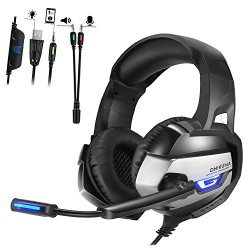
Stereo Gaming Headset for PS4,, Xbox One (Adapter Needed), Noise Cancelling Over Ear PC Gaming Headphones with Mic and Volume Control, Glaring LED Lights and Bass Surround
Note: ♥ This headset is NOT USB-Headset, the USB interface is only used for power supply to LED light. ♥ This gaming headset works well on new Xbox one s/x, PS4 and notebook PC with the 3.5mm jack plug in directly. ♥ The 1-to-2 audio adapter (Included) is used to make the headphone and microphone
Note:
♥ This headset is NOT USB-Headset, the USB interface is only used for power supply to LED light.
♥ This gaming headset works well on new Xbox one s/x, PS4 and notebook PC with the 3.5mm jack plug in directly.
♥ The 1-to-2 audio adapter (Included) is used to make the headphone and microphone work at the same time when connect with desktop computer.
♥ Extra Microsoft adapter (Not Included) is needed when connecting with OLD VERSION Xbox One controller.
♥ This gaming headphone is NOT COMPATIBLE with PS3 and Xbox 360.
Specifications:
★The metal retractable headband, fitting for all head shapes ★50mm magnetic neodymium driver, providing 3D stereo sound field ★Noise canceling soft microphone, well ★Speaker diameter: 50mm
★Impedance: 16ohm±15%
★Sensitivity: 114dB±3dB
★Frequency: 20-20000Hz
★Mic dimension: 6.0 * 2.7mm
★Mic sensitivity: -36dB +/- 1dB
★Mic impedance: 2.2kohm
★Directivity: Omni-directional
★LED working voltage: DC5V +/- 5%
★Working current: Below 100mA
★Headset interface: USB (plug the USB connector, LED light is on, unplug for off) + 3.5mm
Stereo Audio and Mic plug
• Cable length: Approx. 2.2m / 7.22ft
• Headphone size: Approx. 20.5 * 11* 19cm / 7.68* 4.72* 8.27in
•Headphone weight: 390g / 14oz
•Package size: 21.2 * 11.5 * 19.1cm / 8.4 * 4.5 * 7.5in
• Package weight: 543g / 1.2Lbs
Package content:
1 * ONIKUMA K5 Gaming Headset
1 * Multilanguage User Manual
1 *1 to 2 3.5mm Jack adapter
PS4 Setting:
❤1. Before apply the headset on your PS4, please test it with your cellphone to ensure it function well.
❤ 2. Insert the headset own 3.5mm jack plug into the Gamepad, then long press the PS button or enter the system Settings.
❤ 3. There is a peripheral machines, choose “Adjust Sound and Devices”, “output to the headphones”, then change it to “all audio “.



, Noise Cancelling Over Ear PC Gaming Headphones with Mic and Volume Control, Glaring LED Lights and Bass Surround', 'https%3A%2F%2Fpcgamerstores.com%2F%3Fp%3D8586'))
Comments