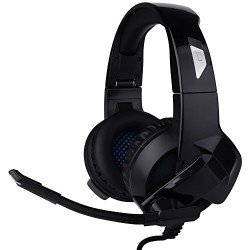
Cehensy Gaming Headset Over Ear Headphone Stereo Surround Sound Earpiece Noise Cancelling Earphone with Mic for PS4, Xbox One, Nintendo Switch/3DS/New 3DSII, Laptop, Computer, Tablet, iPad, Phones etc
Specifications: Name: A3 Gaming Headset Driver diameter: Ø 40mm (NdFeB magnets) Frequency range: 20Hz ~ 20KHz Sensitivity: 121dB±3dB Impedance: 16±15%Ω Max Input: 20 MW Mic sensitivity: -42±3dB Mic frequency range: 50Hz ~ 10KHz Mic impedance: 2.2KΩ Cable length: 1.7M±15% Plug: 3.5mm pin Item weight: approx. 0.64 lbs Notice: 1.The headset is applicable to 3.5MM quadrupole
Specifications:
Name: A3 Gaming Headset
Driver diameter: Ø 40mm (NdFeB magnets)
Frequency range: 20Hz ~ 20KHz
Sensitivity: 121dB±3dB
Impedance: 16±15%Ω
Max Input: 20 MW
Mic sensitivity: -42±3dB
Mic frequency range: 50Hz ~ 10KHz
Mic impedance: 2.2KΩ
Cable length: 1.7M±15%
Plug: 3.5mm pin
Item weight: approx. 0.64 lbs
Notice:
1.The headset is applicable to 3.5MM quadrupole single plug audio device such as laptop, tablet, PC, mobile phone, etc. With the bisected adapter cable of 3.5mm interface, the 3.5mm dual plug of the computer can be used.
2.Generally, the cable end or microphone end is designed on the left-side, so wear the cable end or microphone end on the left ear when wearing headset.
3.When using the headset on computer, please make sure the headset microphone switch is turned on; then make sure the computer microphone switch is turned on. Please find the “speaker” icon in the computer taskbar, and double-click to enter the volume control for settings. And enter into the “voice” for settings on the “Control Panel”.
4.Please make sure the headset volume adjustment button is at the minimum volume, and can be adjusted to the appropriate volume.
5.Please use the headset to enjoy the game.
6.Support the 32-bit and 64-bit Win7 / Win8 / Win10/ XP
Packaging Includes:
A3 Gaming Headset x 1
Manual x 1

)
Comments